The Mintsoft dashboard provides a real-time overview of your orders, stock, and warehouse activity.
It gives you a quick snapshot of what is happening across your account without needing to go into each section.
What you’ll see on the dashboard:
The dashboard is made up of modules. What you see will depend on which modules are enabled.
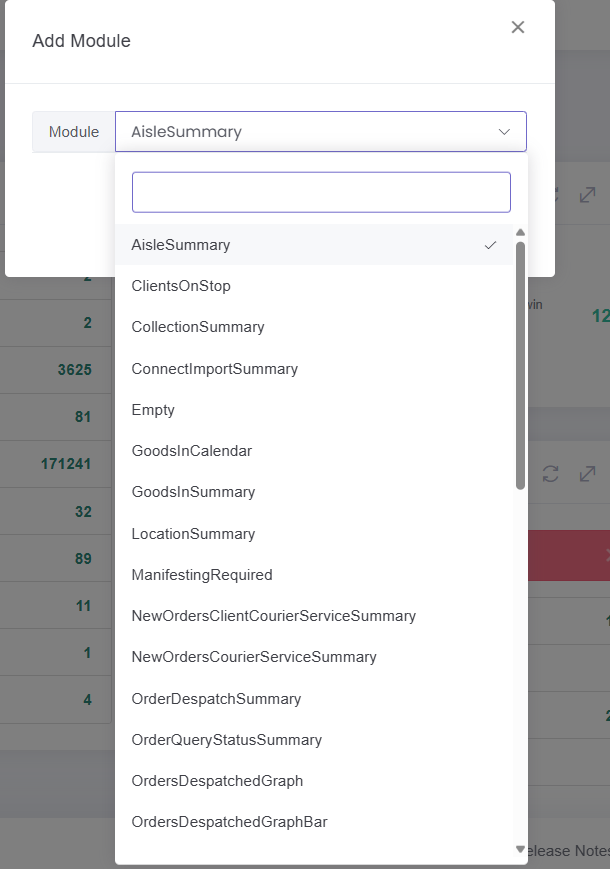
Examples of modules you can add include:
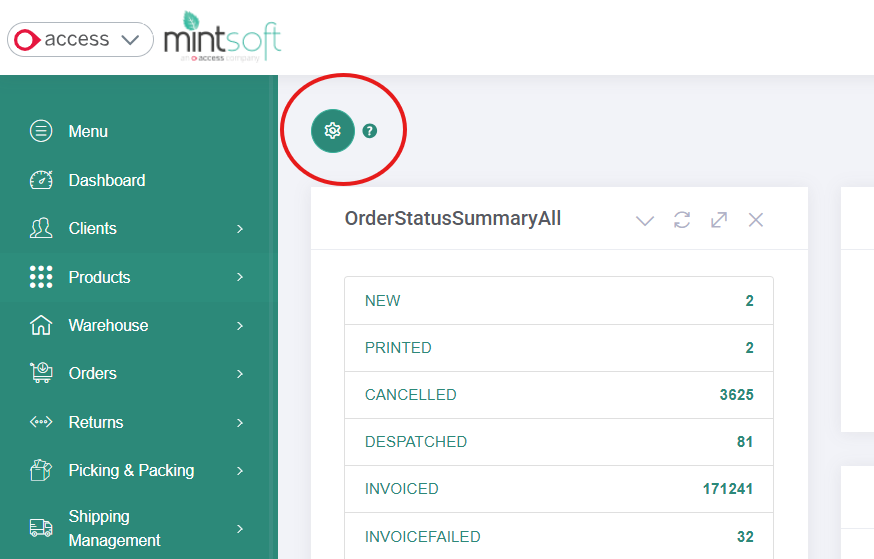
Order status summary
Shows a breakdown of orders by status, such as awaiting picking, despatched, or on backorderOrder errors or issues
Highlights any problems with orders that may need attentionTop selling products
Shows your best performing SKUsRevenue by channel
Displays where your orders are coming fromReturns and shipping summaries
Provides an overview of returns and shipment activity
Customising your dashboard
You can choose what appears on your dashboard.
To do this:
Click the settings (cog) icon in the top left corner
Select “Add Module”
Choose the modules you want to display
This allows you to tailor the dashboard to show the information most relevant to you.
How to use the dashboard
The dashboard is useful for:
Checking order volumes and statuses
Identifying issues quickly
Monitoring performance
Getting a quick overview of operations
When to use other sections
The dashboard shows a summary. For more detail, go to:
Orders to view and manage individual orders
Products to check stock levels
Returns to review returned items
Common questions
Why does my dashboard look different?
The dashboard can be customised, so your view may differ depending on which modules are selected.
Why doesn’t the dashboard match my store exactly?
This can happen due to:
Sync delays
Orders still being processed
Stock updates not yet reflected
Was this article helpful?
That’s Great!
Thank you for your feedback
Sorry! We couldn't be helpful
Thank you for your feedback
Feedback sent
We appreciate your effort and will try to fix the article