Integrations in Mintsoft connect your sales channels to the warehouse, allowing orders and stock to sync automatically.
What integrations do
Once connected, integrations handle the flow of data between your store and Mintsoft.
This includes:
- Importing orders from your sales channels
- Updating stock levels across platforms
- Sending tracking information back to your store
How the process works
- A customer places an order on your website or marketplace
- The order is automatically imported into Mintsoft
- The warehouse picks, packs, and processes the order
- A shipping label is generated
- Tracking information is sent back to your store
- Stock levels are updated across your channels
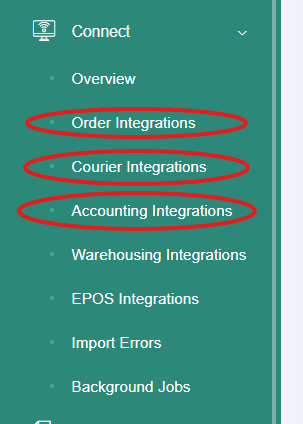
Where to manage integrations
Go to:
Connect → Order Integrations
You may also use:
- Courier Integrations for shipping connections
- Accounting Integrations for finance systems
Important
- Orders will only import if the integration is set up correctly
- Stock levels rely on accurate inventory in Mintsoft
- Any errors in the connection may prevent orders from syncing
What to do next
If orders are not coming through or stock is not updating, check your integration settings or contact support.
Was this article helpful?
That’s Great!
Thank you for your feedback
Sorry! We couldn't be helpful
Thank you for your feedback
Feedback sent
We appreciate your effort and will try to fix the article