You can view all your orders in Mintsoft from the Orders section.
How to access your orders
To view your orders:
Go to Orders from the left-hand menu
Press overview.
Here, you’ll see a list of all your orders.
What you can see
On the orders page, you can view information such as:
Order numbers
Customer details
Order status
Order date
Courier and service
Tracking information (once available)
Using filters
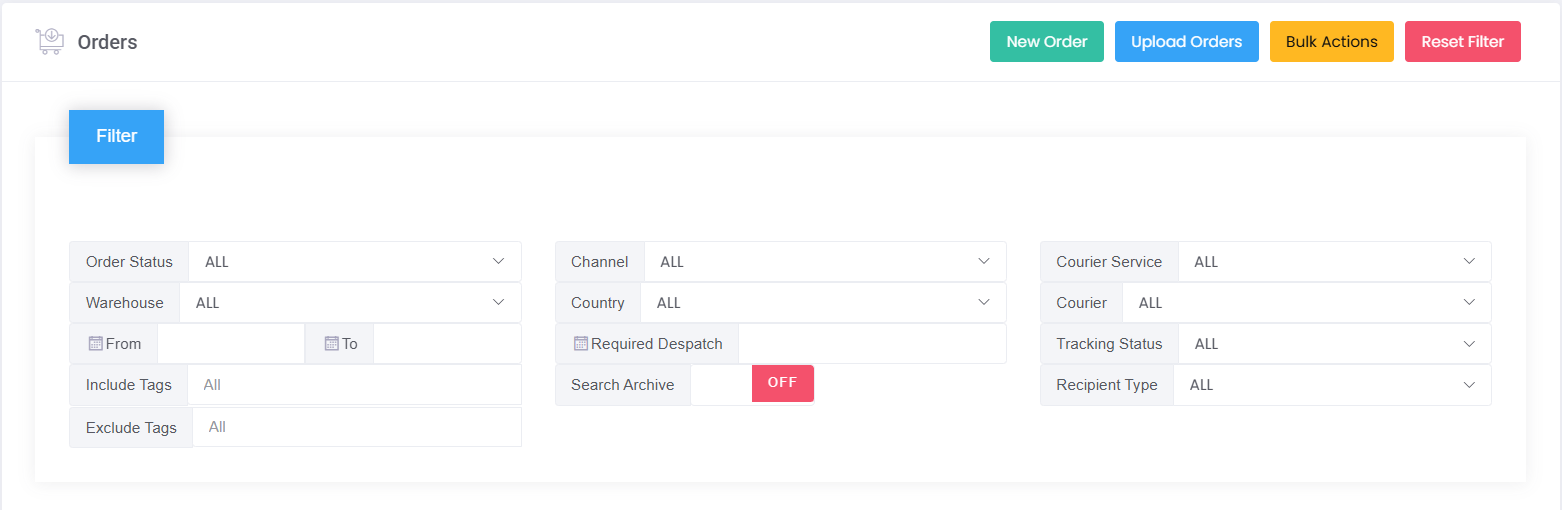
You can use filters to find specific orders.
To filter orders:
Click Filter
Select the criteria you want (e.g. status, date range, warehouse)
Click Go
This helps you quickly find orders based on their status or other details.
Viewing a specific order
To view more detail on an order:
Click on actions, then press details.
You’ll then see full details, including items, status updates, and shipping information.
Common questions
Why can’t I find my order?
This may be because:
The order has not yet synced into Mintsoft
Filters are applied
The order is in a different status
Try clearing your filters or searching by order number.
Was this article helpful?
That’s Great!
Thank you for your feedback
Sorry! We couldn't be helpful
Thank you for your feedback
Feedback sent
We appreciate your effort and will try to fix the article