How to edit an order before despatch in Mintsoft

Created by Matthew Stephens, Modified on Fri, 20 Mar at 3:33 PM by Matthew Stephens

You can edit an order in Mintsoft before it has been despatched.


When you can edit an order

You can edit an order while it is still in the early stages, such as:

  • Awaiting picking

  • Processing

Once an order has been picked, packed, or despatched, changes may no longer be possible.


How to edit an order

  1. Go to Orders → Overview

  2. Find the order using the search bar or filters

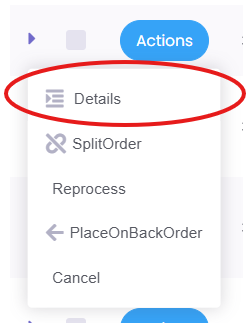
  3. Click the Actions button next to the order

  4. Select Details

From here, you can view and edit the order information.


What you can edit

Depending on the order status, you may be able to update:

  • Delivery address

  • Order items

  • Quantities

  • Courier or shipping service


Important

If the order has already been processed or is too far along, you may not be able to edit it.

In this case, please contact support as soon as possible and we will advise on the next steps.

Related definitions

  • What does awaiting picking mean?

  • What does despatched mean?

  • What is a shipping label?

Was this article helpful?

That’s Great!

Thank you for your feedback

Sorry! We couldn't be helpful

Thank you for your feedback

Let us know how can we improve this article!

Select at least one of the reasons
CAPTCHA verification is required.

Feedback sent

We appreciate your effort and will try to fix the article