You can cancel an order in Mintsoft if it has not yet been despatched.
When you can cancel an order
You can cancel an order while it is still in early stages, such as:
Awaiting picking
Processing
Once an order has been picked, packed, or despatched, it may no longer be possible to cancel.
How to cancel an order
Go to Orders → Overview
Find the order using the search bar or filters
Click the Actions button next to the order
Select Cancel
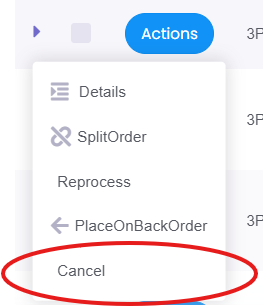
The order will then be marked as cancelled.
Important
If the order has already been processed or is too far along, cancellation may not be possible.
If you need to cancel an order urgently, please contact support as soon as possible.
Was this article helpful?
That’s Great!
Thank you for your feedback
Sorry! We couldn't be helpful
Thank you for your feedback
Feedback sent
We appreciate your effort and will try to fix the article